

277 lines
12 KiB
Markdown
277 lines
12 KiB
Markdown
<!-- Source: https://wiki.transportfever3.com/doku.php?id=modding:general:modscripts (fetched 2026-10-04) -->
|
||
|
||
### Table of Contents
|
||
|
||
* [Mod Params](#mod_params)
|
||
* [Script Functions](#script_functions)
|
||
|
||
+ [preRunScript](#prerunscript)
|
||
+ [runScript](#runscript)
|
||
+ [postRunScript](#postrunscript)
|
||
|
||
- [Resource Filtering](#resource_filtering)
|
||
- [Resource Modification](#resource_modification)
|
||
- [Resource Addition](#resource_addition)
|
||
|
||
# Mod Parameters and Scripts
|
||
|
||
Mods may have parameters to customize the user experience depending on the user preferences. The selected parameters can be used in the scripts that each mod can provide.
|
||
|
||
## Mod Params
|
||
|
||
Mods can provide individual parameters in the `params` property. These use the parameter types that are available for [constructions](https://wiki.transportfever3.com/doku.php?id=modding:constructions:basics#parameters "modding:constructions:basics") too. The user can select his preferences in the mod selection when creating a new game or loading an existing savegame. Parameters of all mods are available in the script functions described below.
|
||
|
||
```lua
|
||
{
|
||
...
|
||
"params": [
|
||
{
|
||
"key": "param_key",
|
||
"name": "Parametername",
|
||
"tooltip": "Parameter-Tooltip",
|
||
"uiType": "ComboBox",
|
||
"values": [
|
||
"Era A",
|
||
"Era B",
|
||
"Era C"
|
||
],
|
||
"numbers": [1, 2, 3],
|
||
"defaultIndex": 2
|
||
},
|
||
...
|
||
],
|
||
...
|
||
}
|
||
```
|
||
|
||
Each parameter has several properties:
|
||
|
||
* `key` is a string that is used to reference this parameter in functions.
|
||
* `name` is the string that is shown in the ui.
|
||
* `tooltip` is an optional string that is displayed when the user moves to mouse over the name of the parameter.
|
||
* `uiType` is used to select the type of parameter. It is either `Button`, `Slider`, `ComboBox`, `IconButton` or `CheckBox`.
|
||
* `values` is either a list of filepaths in case of `IconButton` parameters or a list of strings for all other types.
|
||
* `numbers` is an optional list of doubles that are returned when referencing the parameters in script functions. If unset, the default values are 1, 2, 3, …
|
||
* `defaultIndex` is an optional integer to specify the default option of the parameter. If unset, the first one is used.
|
||
|
||
While indices in lua and Teal files are 1-based, the `defaultIndex` in the mod.json needs to be set 0-based.
|
||
|
||
## Script Functions
|
||
|
||
The static `mod.json` does not contain executable functions itself, but it may reference a `.script.lua` file for these functions:
|
||
|
||
```lua
|
||
{
|
||
...
|
||
"preRunScript": {
|
||
"fileName": "ug_wiki_example_mod::mod.script@preRunFn"
|
||
},
|
||
"runScript": {
|
||
"fileName": "ug_wiki_example_mod::mod.script@runFn"
|
||
},
|
||
"postRunScript": {
|
||
"fileName": "ug_wiki_example_mod::mod.script@postRunFn"
|
||
},
|
||
...
|
||
}
|
||
```
|
||
|
||
The functions can be referenced with `<modid>::<filename>@<functionname>`. There are three different functions that can be specified for each mod. The base game functions are executed first, then in the order of mod activation:
|
||
|
||
[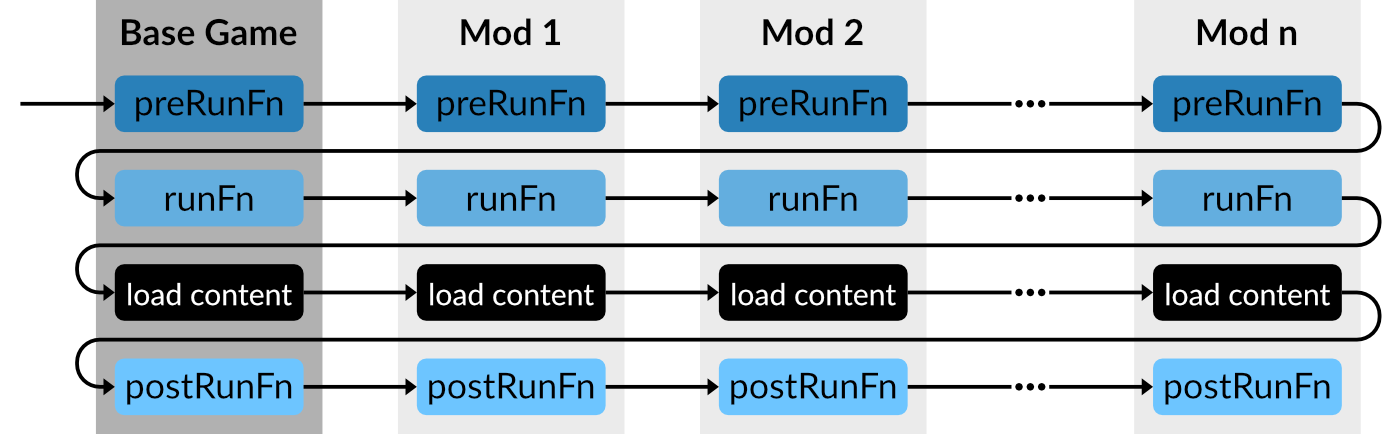](https://wiki.transportfever3.com/lib/exe/fetch.php?media=modding:general:scriptfn.png "modding:general:scriptfn.png")
|
||
|
||
### preRunScript
|
||
|
||
The `preRunScript` function is called before the game and mod resources are loaded. It receives three parameters:
|
||
|
||
* `configDict` containing the selected climate, economy and name list.
|
||
* `allModParams` containing a list of all mod parameters with the mod id as key of the list items. To retrieve the list of parameters for the current mod, `allModParams[getCurrentModId()]` can be used.
|
||
* `baseConfig` a list of all properties that are relevant for the simulation and gameplay aspects.
|
||
|
||
The preRunFn allows the adjustment of this `baseConfig` by overriding the individual values. See [game configs](https://wiki.transportfever3.com/doku.php?id=modding:scripting:baseconfig "modding:scripting:baseconfig") for a detailed list of all existing configuration properties in the base config.
|
||
|
||
### runScript
|
||
|
||
The main function that is called when a mod is loaded is the `runScript` function. It receives two parameters:
|
||
|
||
* `configDict` containing the selected climate, economy and name list.
|
||
* `allModParams` containing a list of all mod parameters with the mod id as key of the list items. To retrieve the list of parameters for the current mod, `allModParams[getCurrentModId()]` can be used.
|
||
|
||
It is possible to register file filters and resource modifiers that are considered when loading the game resources after all the `runFn` are executed. However it is recommended to filter and alter resources in the `postRunFn` whenever that is possible. See [resource modifiers](https://wiki.transportfever3.com/doku.php?id=modding:scripting:modifiersfilters#resource_modifiers "modding:scripting:modifiersfilters") and [file filters](https://wiki.transportfever3.com/doku.php?id=modding:scripting:modifiersfilters#file_filters "modding:scripting:modifiersfilters") for the filters and modifiers and below for the `postRunFn`.
|
||
|
||
### postRunScript
|
||
|
||
The `postRunScript` function is called once after all resources are loaded. It receives two parameters:
|
||
|
||
* `configDict` containing the selected climate, economy and name list.
|
||
* `allModParams` containing a list of all mod parameters with the mod id as key of the list items. To retrieve the list of parameters for the current mod, `allModParams[getCurrentModId()]` can be used.
|
||
|
||
It is possible to use the `api.res.*` script functions provided by the [Scripting API](https://wiki.transportfever3.com/doku.php?id=modding:scripting:api "modding:scripting:api"), e.g. to add additional multiple unit configurations or construction modules based on the loaded resources.
|
||
|
||
#### Resource Filtering
|
||
|
||
This example has a mod parameter that allows optional filtering of models. It is available for [download](https://wiki.transportfever3.com/lib/exe/fetch.php?media=modding:templates:wiki_example_mod_param_filter.zip "modding:templates:wiki_example_mod_param_filter.zip (136.1 MB)").
|
||
|
||
Explanation
|
||
|
||
The parameter is defined in the `mod.json`:
|
||
|
||
```lua
|
||
...
|
||
"params": [
|
||
{
|
||
"key": "paramVehicleFilter",
|
||
"name": "Available Designs",
|
||
"tooltip": "Enables the liveries",
|
||
"uiType": "Combobox",
|
||
"values": [
|
||
"TGV PSE",
|
||
"TGV Atlantique",
|
||
"TGV PSE & Atlantique"
|
||
],
|
||
"defaultIndex": 2
|
||
}
|
||
],
|
||
...
|
||
```
|
||
|
||
The result of the defined mod parameter can be retrieved in the `postRunFn` in the `mod.script.tl` to be used for filtering the models and multiple units in the repository.
|
||
|
||
```lua
|
||
local modelsToHide: {{string}} = {
|
||
[1] = { -- Param Option 1
|
||
"wiki_example_mod_param_filter::/vehicle/train/tgv/tgv_atlantique_front.mdl",
|
||
"wiki_example_mod_param_filter::/vehicle/train/tgv/tgv_atlantique_middle1.mdl",
|
||
...
|
||
},
|
||
[2] = { -- Param Option 2
|
||
"wiki_example_mod_param_filter::/vehicle/train/tgv/tgv_front.mdl",
|
||
"wiki_example_mod_param_filter::/vehicle/train/tgv/tgv_middle1.mdl",
|
||
...
|
||
},
|
||
[3] = {} -- Param Option 3
|
||
}
|
||
|
||
local multipleUnitsToHide: {{string}} = {
|
||
[1] = {
|
||
"wiki_example_mod_param_filter::/vehicle/train/tgv/tgv_atlantique.mu",
|
||
},
|
||
[2] = {
|
||
"wiki_example_mod_param_filter::/vehicle/train/tgv/tgv.mu",
|
||
},
|
||
[3] = { }
|
||
}
|
||
```
|
||
|
||
These two arrays of arrays contain the list of models/multiple units that will be hidden depending on the value of the script param.
|
||
|
||
```lua
|
||
local selectedFilterSet: integer = allModParams[getCurrentModId()].paramVehicleFilter
|
||
```
|
||
|
||
The value of the parameter is fetched based on its key.
|
||
|
||
```lua
|
||
for _, v in ipairs(modelsToHide[selectedFilterSet]) do
|
||
local modelId : number = api.res.modelRep.find(v)
|
||
if modelId ~= -1 then
|
||
api.res.modelRep.setVisible(modelId, false)
|
||
end
|
||
end
|
||
for _, v in ipairs(multipleUnitsToHide[selectedFilterSet]) do
|
||
local muId : number = api.res.multipleUnitRep.find(v)
|
||
if muId ~= -1 then
|
||
api.res.multipleUnitRep.setVisible(muId, false)
|
||
end
|
||
end
|
||
```
|
||
|
||
Depending on the parameter value, one of the lists is looped to hide the models/multiple units. This is done by finding the id of the resource in the appropriate [repository](https://wiki.transportfever3.com/script-doc/api/res.html#$api.res~Res "https://wiki.transportfever3.com/script-doc/api/res.html#$api.res~Res") with the function `find` and then setting it's visibility to false with `setVisible`. This hinders it from appearing in vehicle stores at all.
|
||
|
||
#### Resource Modification
|
||
|
||
This example has a mod parameter that allows optional modification of vehicle capacities. It is available for [download](https://wiki.transportfever3.com/lib/exe/fetch.php?media=modding:templates:wiki_example_mod_param_modifier.zip "modding:templates:wiki_example_mod_param_modifier.zip (2.9 KB)").
|
||
|
||
Explanation
|
||
|
||
The parameter is defined in the `mod.json`:
|
||
|
||
```lua
|
||
...
|
||
"params": [
|
||
{
|
||
"key": "paramVehicleModifier",
|
||
"name": "Capacity",
|
||
"tooltip": "Scales the vehicle capacity",
|
||
"uiType": "Slider",
|
||
"values": [
|
||
"1x",
|
||
"2x",
|
||
"3x",
|
||
"4x"
|
||
],
|
||
"defaultIndex": 1
|
||
}
|
||
],
|
||
...
|
||
```
|
||
|
||
The result of the defined mod parameter can be retrieved in the `postRunFn` in the `mod.script.tl` to be used for modifying the models in the repository.
|
||
|
||
```lua
|
||
local capacityMultiplier: integer = allModParams[getCurrentModId()].paramVehicleModifier
|
||
```
|
||
|
||
The value of the parameter is fetched based on its key.
|
||
|
||
```lua
|
||
api.res.modelRep.forEachModelWithMetadata("transportVehicle", function(name : string)
|
||
local model = api.res.modelRep.getAsTable(api.res.modelRep.find(name))
|
||
local tv = model.metadata["transportVehicle"] as ModelMetadata.TransportVehicle
|
||
if tv then
|
||
for i = 1, #tv.compartments do
|
||
for j = 1, #tv.compartments[i].loadConfigs do
|
||
if tv.compartments[i].loadConfigs[j].cargoEntry ~= nil then
|
||
local cargoEntry = tv.compartments[i].loadConfigs[j].cargoEntry
|
||
if cargoEntry and cargoEntry.capacity then
|
||
tv.compartments[i].loadConfigs[j].cargoEntry.capacity = cargoEntry.capacity * capacityMultiplier
|
||
end
|
||
end
|
||
end
|
||
end
|
||
api.res.modelRep.setAsTable(api.res.modelRep.find(name), model)
|
||
end
|
||
end)
|
||
```
|
||
|
||
A loop over all models with metadata `transportVehicle` is started. The model is fetched from the `api.res.modelRep` by using the `getAsTable(index)` function. This function provides a lua table representation of the model that can be edited freely. After finishing the editing, the result needs to be pushed back to the repository by using the `setAsTable(index, data)` function.
|
||
|
||
#### Resource Addition
|
||
|
||
This example adds a second version of all vehicle models that have no purchase cost but increased maintenance price, mimicking a "leasing" option. It is available for [download](https://wiki.transportfever3.com/lib/exe/fetch.php?media=modding:templates:wiki_example_mod_param_adder.zip "modding:templates:wiki_example_mod_param_adder.zip (2.1 KB)").
|
||
|
||
Explanation
|
||
|
||
The `postRunFn` in the `mod.script.tl` is used to loop over all models with `transportVehicle` metadata:
|
||
|
||
```lua
|
||
api.res.modelRep.forEachModelWithMetadata("transportVehicle", function(name : string)
|
||
local model = api.res.modelRep.getAsTable(api.res.modelRep.find(name))
|
||
local mc = model.metadata["maintenance"] as ModelMetadata.Maintenance
|
||
local cost = model.metadata["cost"] as ModelMetadata.Cost
|
||
local tv = model.metadata["transportVehicle"] as ModelMetadata.TransportVehicle
|
||
if cost and mc then
|
||
local costPrice = cost.price
|
||
local lifespan = mc.lifespan
|
||
mc.runningCosts = mc.runningCosts + (3 * costPrice) / (2 * lifespan / 1460)
|
||
cost.price = 0
|
||
tv.groupFileName = name
|
||
api.res.modelRep.addAsTable(name .. "_leasing", model)
|
||
end
|
||
end)
|
||
```
|
||
|
||
A loop over all models with metadata `transportVehicle` is started. The model is fetched from the `api.res.modelRep` by using the `getAsTable(index)` function. This function provides a lua table representation of the model that can be edited freely. After finishing the editing, the result is pushed back to a new entry in the model repository by using the `addAsTable(name, data)` function.
|
||
|
||
Be aware that it's not possible to add new 3d resources with the scripts, it is only possible to reference existing `.mdl` data for the visual models by adjusting the `modelPath` reference in the `model` struct.
|