

109 lines
8.3 KiB
Markdown
109 lines
8.3 KiB
Markdown
<!-- Source: https://wiki.transportfever3.com/doku.php?id=modding:general:publishing (fetched 2026-10-04) -->
|
|
|
|
### Table of Contents
|
|
|
|
* [Compensation and Monetization of Mods](#compensation_and_monetization_of_mods)
|
|
* [Publish](#publish)
|
|
|
|
+ [Customizing](#customizing)
|
|
* [Update](#update)
|
|
* [Publish on other Platforms](#publish_on_other_platforms)
|
|
|
|
# Publish a Mod
|
|
|
|
Once a mod is finished, you may consider to upload the mod to a place where other users may download it to use. The official mod browser is hosted by our partner [mod.io](https://mod.io/ "https://mod.io/"). It allows players on all platforms (Win/Mac/Linux as well as PS5 and Xbox Series) to access mods directly within the game.
|
|
|
|
To ensure fair play for everyone, there are a few mandatory rules to follow:
|
|
|
|
* Do not upload content for which you do not have copyright or permission to distribute yourself!
|
|
* Mods must be non-commercial and accessible in full for free to all users. (see below)
|
|
* Mods must not contain offensive or inappropriate content.
|
|
* Mods (aka User Generated Content) must comply with the End User License Agreement and the Terms of Use by mod.io.
|
|
* Mods must follow the instructions from our [modding manual](https://wiki.transportfever3.com/doku.php?id=modding:start "modding:start").
|
|
|
|
Urban Games allows the use of game files from the base game of Transport Fever, Transport Fever 2 and Transport Fever 3 to create mods for Transport Fever 3. When using game files, it is mandatory to state the source of the files. You are not permitted to use the game files for games or projects other than the Transport Fever series without explicit permission from Urban Games.
|
|
|
|
## Compensation and Monetization of Mods
|
|
|
|
We recognize that creating and maintaining mods can require a significant investment of time and, in some cases, money. As with the previous titles of the Transport Fever series, modders should therefore have reasonable ways to receive compensation and support for their work. As a fair and consistent rule direct **support of modders is permitted**, the **sale of content is not**.
|
|
|
|
Allowed forms of modder support include:
|
|
|
|
* **Donations:** Users may voluntarily provide financial support to modders without any expectation to receive something in return.
|
|
* **Direct commissions:** Users may commission modders to create or modify content according to their individual requests, providing that the resulting content is provided to all players free of charge.
|
|
* **Patreon and similar support programs:** Modders may use membership or donation platforms to receive financial support from their community. Supporter programs may provide additional benefits, such as:
|
|
|
|
+ Early beta access to mods, for a period of **up to 31 days before public release**
|
|
+ Participation in polls or voting on future mod development
|
|
+ Exclusive development blogs, posts, videos, or behind-the-scenes content
|
|
+ Similar benefits that provide additional interaction or insight into the modding process
|
|
|
|
Not permitted selling of content:
|
|
|
|
* **Permanent paywalls:** A mod may not be permanently restricted to paying supporters or made available only through a Patreon membership or similar paid subscription for greater than the 31 day early beta method.
|
|
* **Selling individual mods:** Mods may not be sold through online shops, marketplaces, or other commercial storefronts as products.
|
|
* **Advertising with incomplete mods:** Feature reduced or other dummy mods may not be published to advertise exclusive feature-complete beta mods that are only accessible with the support programs.
|
|
|
|
Accordingly, a modder may use Patreon or similar platforms to generate income and offer supporters additional benefits, but the full mod itself must ultimately be made available to the general community without requiring payment. Additional means of support may be provided by Urban Games as part of the [Curated Mods Program](https://www.transportfever3.com/curated-mods-program/ "https://www.transportfever3.com/curated-mods-program/") (application and approval is required).
|
|
|
|
## Publish
|
|
|
|
Start the game and select the Mod Hub in the main menu. There is a My Mods tab, if there is at least one mod in your staging area. If not yet done, copy your mod to the `staging_area` subdirectory in the userdata directory. Usually it's located here:
|
|
`C:\Program Files (x86)\Steam\userdata\<your Steam ID>\3493540\local\staging_area\`
|
|
|
|
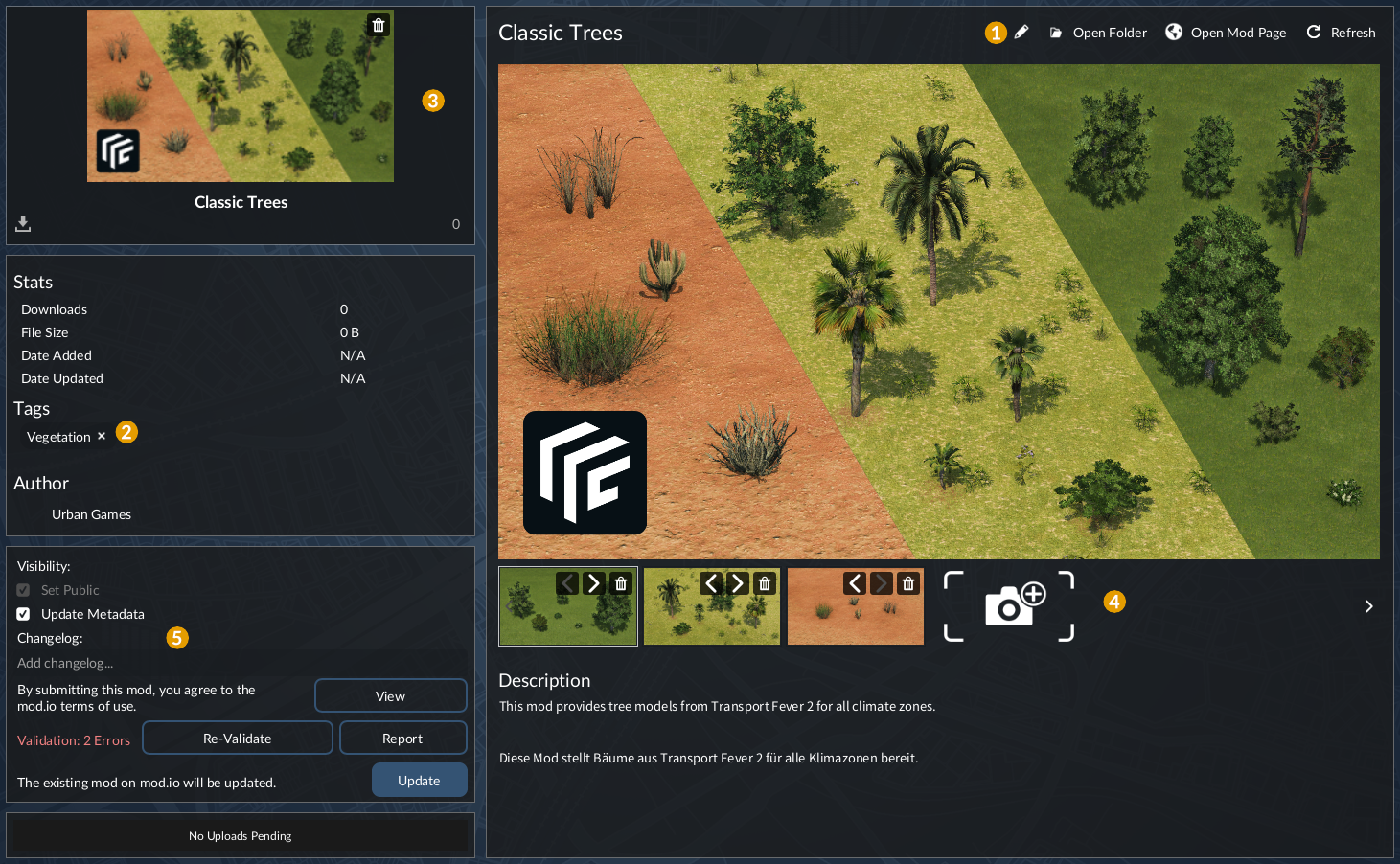
Select the mod that you would like to publish in order to see the mod details and add your final adjustments.
|
|
|
|
It is possible to adjust:
|
|
|
|
* 1 the name of the mod
|
|
* 2 the tags of the mod
|
|
* 3 the cover and additional images for the gallery
|
|
* 4 the visibility
|
|
* 5 the changelog message
|
|
|
|
Once you are ready publish your mod by clicking Upload at the bottomn left. Before upload, the game performs a validation pass to ensure the mod fulfills the requirements for Transport Fever 3. If it fits to the stricter console requirements, a version with adapted textures is prepared and automatically approved for PS5 and Xbox Series as well.
|
|
|
|
|
|
|
|
### Customizing
|
|
|
|
Once the upload of the mod is complete, the entry will be opened on mod.io. Several edit functions are available by pressing the edit button in the top right corner.
|
|
|
|
In the General settings tab, there are four sub pages:
|
|
|
|
* Mod Profile name, summary, description, URL, listing image (cover/thumbnail), visibility setting and the selection of tags.
|
|
* Media Additional screenshots for the gallery section on the detail page of the mod.
|
|
* Files The history of uploaded files and the approval status for the different platforms.
|
|
* Dependencies References to other mods that are required and a list of mods that require your mod.
|
|
|
|
The Preview tab offers the possibility to give preview access to other players so they can beta test your mod. It is also possible to give preview access via url instead of manual approval of seperate user accounts.
|
|
|
|
It is possible to add other users as Team members of a mod. There are three roles to choose from:
|
|
|
|
* Administrator - Full access (includes editing the mod details themselves, as well as the team)
|
|
* Manager - Ability to manage mod details. Cannot edit team or delete files
|
|
* Moderator - Ability to moderate comments
|
|
|
|
All reports by players are listed in the Reports tab. It is possible to respond to the reporter to discuss additional details.
|
|
|
|
Download numbers, regional distribution of players and other statistics are collected in the Stats tab.
|
|
|
|
## Update
|
|
|
|
To update an existing mod, simply open the Mod Hub in the main menu and go to My Mods again. Then select the mod to update. If you can read `The existing mod on mod.io will be updated` in the bottom left box next to an Update button, the mod.io item that should be updated is properly recognized. Otherwise, the reference might be missing.
|
|
|
|
Once a mod is uploaded to mod.io, a `mod.io_fileid.txt` file is generated in the \_metadata folder of the mod. This file is required to find the right existing mod.io entry to update. If you lost the file, you may add it manually. The content is just the entry id that you may find in the info box on the right side of a mod detail page on mod.io.
|
|
|
|
Please increase the revision number in the `mod.json` before upload and provide a useful changelog message to inform the other players what changed.
|
|
|
|
If you modified title or description texts directly on mod.io, these changes will be overridden by the content from the mods name and description that is used in the `modinfo.json`! Thus you're advised to manually backup them elsewhere to restore them after the update.
|
|
|
|
## Publish on other Platforms
|
|
|
|
In difference to mod.io, the upload to other mod hosters works manually and not through the game.
|
|
Thus, the workflow may vary depending on the hoster. In most cases, the hosters have some terms of service which have to be accepted before uploading content.
|
|
|
|
For example, the mostly german community website has a download section. The [filebase on transportfever.net](https://www.transportfever.net/filebase/ "https://www.transportfever.net/filebase/") can be accessed by everyone, so Win, MacOS and Linux users may install mods from there as well.
|
|
|
|
It is recommended to include the url in the [modinfo.json](https://wiki.transportfever3.com/doku.php?id=modding:general:moddefinition#modinfojson "modding:general:moddefinition") to point to the download possibility. This helps other users to locate the source of missing mods.
|